
Templates and Meta's categories
Why Meta reviews every template, what each category means, and how to create, fix and edit yours without leaving Konverda.
On this page
A template is a message approved by Meta in advance. It is the only way to write to someone when the 24-hour window is closed. You create them, send them for review and fix them from «Plantillas» (templates), without going through Business Manager.
Why Meta reviews them
Outside the 24-hour window the contact did not ask for your message: it arrives because you decided to send it. Meta reviews that message before allowing it, to protect the person receiving it — and, incidentally, your number, because messages people block or report are paid for out of your number’s quality.
So review is not paperwork. It is the door. The clearer and less commercial a message that claims to be service sounds, the less argument you will have.
The three categories
| Category | What it is for |
|---|---|
| «Marketing» | Promotions and news. Requires consent and an opt-out footer. |
| «Utility» | Follow-up on something the customer started (an order, an appointment). |
| «Auth» | Verification codes. |
From Konverda you can create «Marketing» and «Utility» templates. Authentication only appears as a read-only label on templates that already existed in your Meta account.
The category is chosen first, in the gallery, and then shown without being asked again.
Creating a template
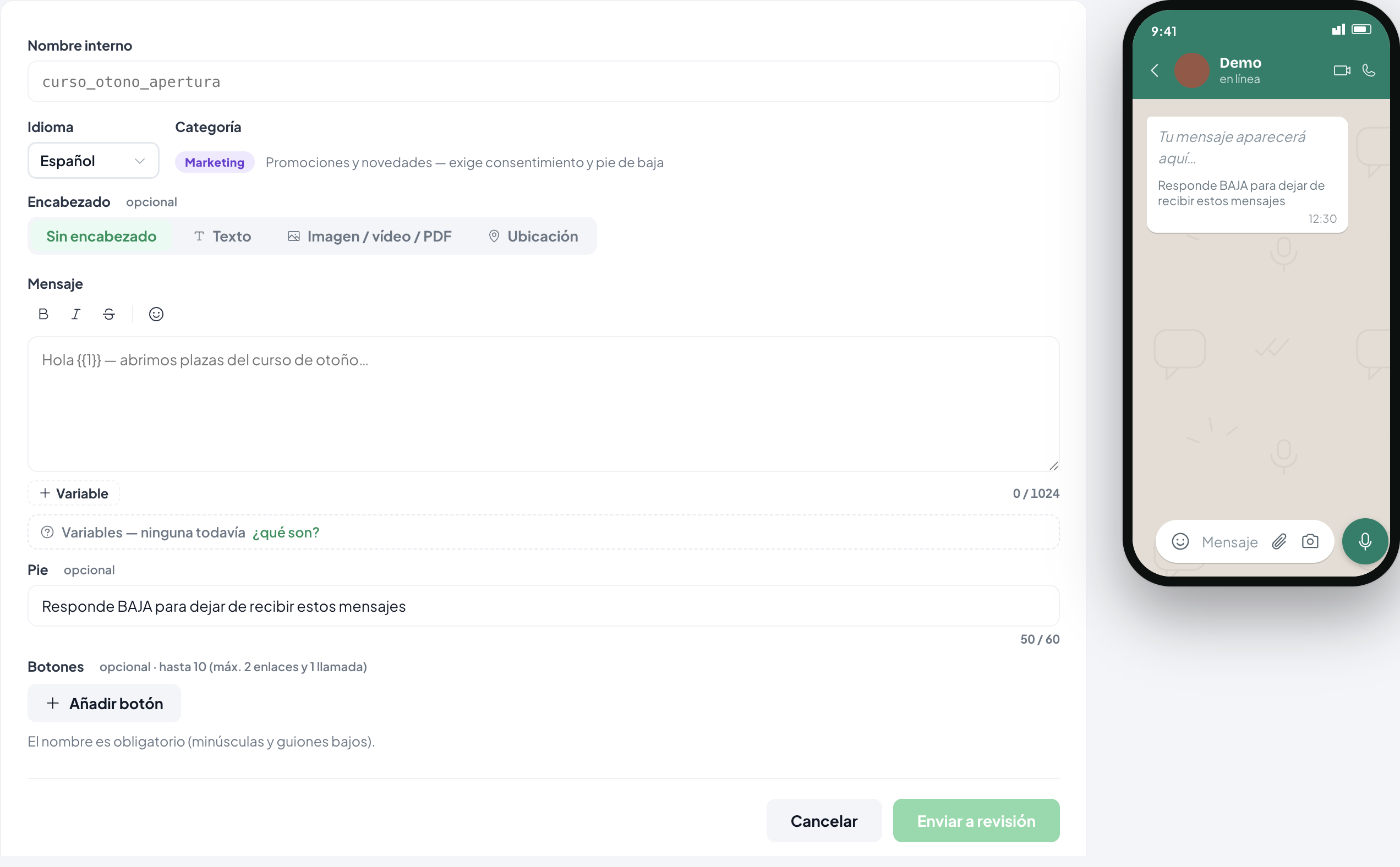
- In «Plantillas», press «Nueva plantilla» (new template).
- Choose the category, then one of the examples that fits it.
- Write the body. If it is marketing, keep the opt-out footer: «Responde BAJA…» protects your number.
- Add a header and buttons if you need them (see below).
- Press «Enviar a revisión» (send for review).
The card shows the Meta · … identifier as soon as Meta acknowledges the template. That identifier is the proof it really left.
The statuses
«Aprobada» (approved) · «En revisión» (in review) · «Rechazada» (rejected) · «Pausada» (paused) · «Deshabilitada» (disabled) · «Marcada» (flagged) · «En apelación» (under appeal) · «Eliminada» (deleted).
Only an «Aprobada» template can be sent. In a flow you may pick one that is still in review — it is marked as such — but the flow will not publish until Meta approves it.
If Meta rejects it
The card shows Meta’s own reason and, where there is one, its recommendation. The fix is «Duplicar y corregir» (duplicate and fix): it opens a copy in the composer, you change what needs changing and send it again. The name cannot be reused, so the copy takes a new one.
Editing it later
Templates in the «Aprobada», «Rechazada» or «Pausada» state can be edited. Editing sends the template back to Meta for review.
Named variables
The holes in a template are not loose numbers: each one declares where its content comes from.
- «Nombre del contacto» (contact name) — with a mandatory «texto de reserva» (fallback) for when we do not know it. Without a fallback, neither the flow publishes nor the wave launches.
- «Enlace dinámico» (campaign link) — each wave’s tracked link. One per template at most.
- «Texto libre» (free text) — you write it when you use it, on launching the wave or fixing it in the flow.
If a hole is left that nobody can fill, the send is refused before it goes out rather than delivering a message with a gap in it.
Headers and buttons
Header: none, text, image / video / PDF, or location. The file behind a media header can be swapped later from the template’s detail page — swapping the file does not go back to Meta.
Buttons: «respuesta rápida» (quick reply), «enlace» (link) or «llamada» (call), in three formats that never mix (buttons, list, or link button).
Where they get used
The same approved template is picked from five places: the wave composer, a flow’s «Plantilla» (template) step, a quick automation, the «Reabrir con plantilla» (reopen with a template) button on a closed conversation, and the reports that audit them.
Still stuck? Contact support